
Where your game clips are saved
| Capture tool | What you get | Where to look |
|---|---|---|
| Steam Game Recording | A clip you can export from Steam as a video file | Open the recording in Steam and use its export option |
| Xbox Game Bar (Windows) | MP4 | Your Videos › Captures folder by default |
| NVIDIA App / ShadowPlay | MP4 | Your Videos folder by default |
| AMD Software (ReLive) | MP4 | The recording folder set in AMD Software |
| OBS Studio | MKV or MP4 | File › Show Recordings |
All of these open directly in Simple GIF Maker, MKV included. On a Steam Deck, the Linux build runs in desktop mode, so you can convert clips on the Deck itself.
Making gameplay GIFs look good and stay small
Gameplay is the hardest thing to fit in a GIF: fast motion, particles and camera pans change almost every pixel of every frame. These habits make the biggest difference:
- Keep it short. Three to six seconds is the sweet spot. Every second you trim is space the rest of the clip can use for quality.
- Crop to the action. Cut away the HUD, minimap and empty sky. Fewer pixels means more room for detail where it matters.
- 480–640 px wide is plenty. Chat apps show GIFs small anyway.
- 15–20 fps. Smooth enough for most action, at half the frames of a 30 fps clip.
- Let a size target decide the rest. Pick Discord – 10 MB and the app finds the best mix of size, frame rate and colors that fits. If you care most about smooth motion, tick Keep fps.
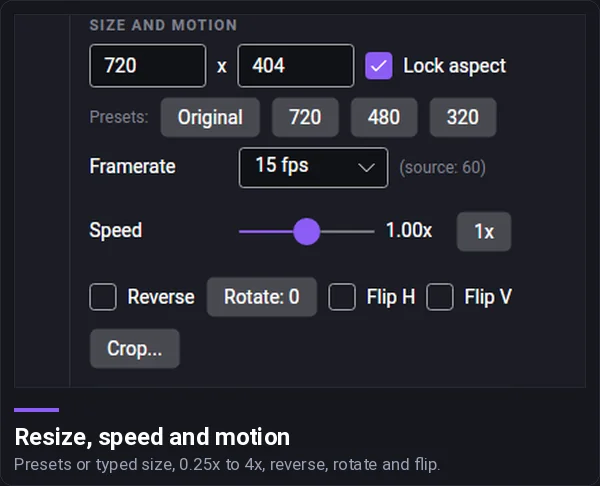
Fun extras
- Slow motion: set Speed to 0.5× or 0.25× for a dramatic replay of a clutch moment.
- Speed up: up to 4× for a long route, a build or a speedrun segment.
- Reverse for a rewind effect, or loop it a set number of times instead of forever.
If it won’t fit
Sometimes a clip is too long or too busy to fit the target, even at the lowest settings the search allows. Simple GIF Maker tells you instead of handing you an oversized file. Here’s what it said when we asked it to squeeze a 10-second 1080p clip into 0.3 MB:
Even at minimum quality this clip lands at ~2.10 MB. Trim the selection, or raise the target size.
Trim a second or two, or export animated WebP instead. It’s typically several times smaller than a GIF.
Frequently asked questions
Why are gameplay GIFs so big?
GIF compresses well when most of the picture stays still. In games almost everything moves, so nearly every pixel has to be stored again in every frame. Trimming, cropping and a lower frame rate help most.
What's the best GIF size for Discord?
Under 10 MB for free accounts at the time of writing. Use the Discord – 10 MB preset. For Nitro there's a 500 MB preset. More on Discord's limits.
Does Simple GIF Maker work on the Steam Deck?
Its native Linux build runs on SteamOS in desktop mode. It’s a desktop app, so a mouse or the trackpads plus a keyboard work best. It isn’t designed for Gaming Mode or controller-only use.
Can I record gameplay with Simple GIF Maker?
No. It converts clips you’ve already recorded with Steam, OBS, Game Bar or your GPU’s capture software.