
What “native” means here
- No Wine or Proton. Steam installs the Linux build on Linux and the Windows build on Windows.
- Self-contained. The app carries its own runtime and its own build of FFmpeg. There are no distro packages to install and no codec packs.
- Works on SteamOS. It runs in SteamOS desktop mode, so you can turn clips into GIFs on a Steam Deck.
- Same features on both platforms. The Linux and Windows builds share one codebase and one feature set.
Desktop integration
- Show in folder opens your file manager with the exported file selected, through the standard desktop file-manager interface.
- Copy file puts the GIF on the clipboard as a file, ready to paste into a chat or file manager. The app holds it itself, so you don’t need
xcliporwl-copy. On X11, the copied file stays available after you quit only if you run a clipboard manager. - Drag-out works on Linux too. Under Wayland, whether another app accepts the drop depends on your desktop session, so Copy file and Show in folder are there as reliable fallbacks.
- Temp files for previews go to
$XDG_RUNTIME_DIR(or/tmp), and anything older than 24 hours is cleared at startup.
Why not just use ffmpeg?
You can. FFmpeg is what Simple GIF Maker uses under the hood. A good-quality GIF from the command line needs a two-pass palette, something like this:
ffmpeg -ss 2 -t 4 -i input.mp4 \
  -vf "fps=15,scale=480:-1:flags=lanczos,split[a][b];[a]palettegen[p];[b][p]paletteuse=dither=sierra2_4a" \
  output.gif
That trims four seconds from the two-second mark, drops to 15 fps, scales to 480 px wide, builds a palette from the clip, then applies it with Sierra dithering. It works well, but:
- Hitting a size limit means guessing. If the result is 14 MB, you change numbers and run it again, and again. Simple GIF Maker runs that search for you, measuring real encodes, and reports the trade it made.
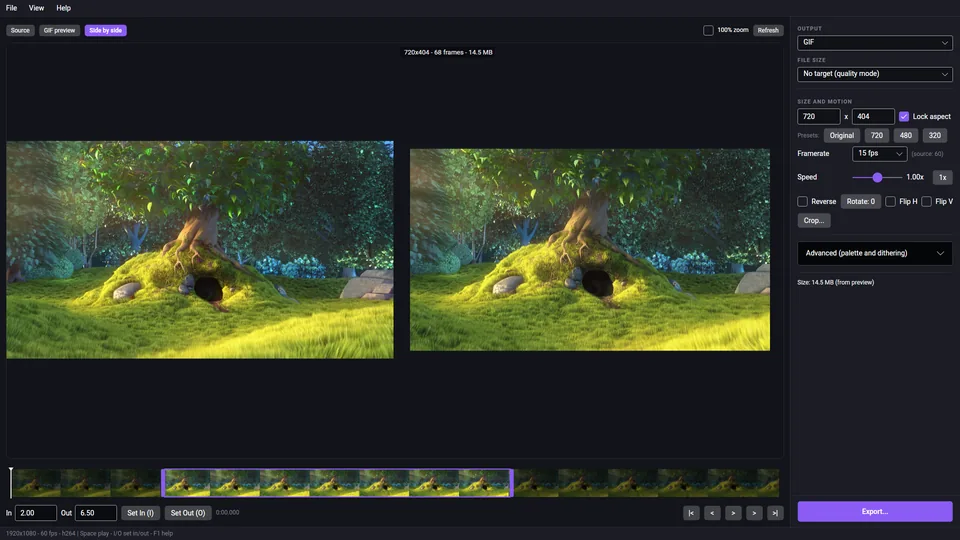
- You can’t see it before it exists. The app’s preview is a real encode with the final palette and dithering, updated as you change settings, with a side-by-side view and a 100% zoom.
- Trimming and cropping by timestamp and pixel offset is slow. A timeline with handles, keyboard in and out points and a draggable crop box is much faster.
- The details are fiddly. Rotation flags, anamorphic pixels, variable frame rates and GIF’s 50 fps ceiling are all handled for you.
Frequently asked questions
Do I need Proton or Wine to run it on Linux?
No. Steam installs the native Linux build. (The Windows build does also run under Proton and Wine, if you ever need it.)
Which Linux distributions does it support?
Current 64-bit x86 distributions, including SteamOS. Because the app is self-contained, it doesn’t depend on your distribution’s .NET or FFmpeg packages.
Does it work on Wayland?
Yes. Everything works, though dragging the exported file into other apps depends on your desktop session under Wayland. Copy file and Show in folder always work.
Can I use it in Steam Deck Gaming Mode?
It’s a desktop app built for a pointer and keyboard, so use SteamOS desktop mode. It isn’t designed for controller-only use.
Is it available as a Flatpak or AppImage?
No. It’s sold and installed through Steam.