
How to convert MP4 to GIF in six steps
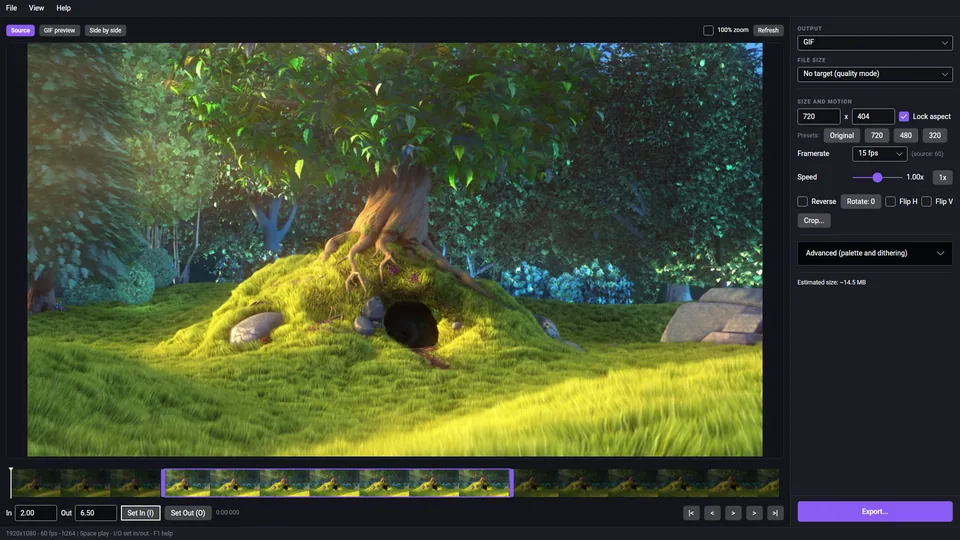
- Open the MP4. Drag it onto the Simple GIF Maker window, or press Ctrl+O.
- Pick the moment. Drag the in and out handles on the thumbnail timeline, or play the clip and press I and O. The arrow keys step one frame at a time; Shift+arrow jumps a second.
- Frame it. Use Crop… to cut away anything that doesn’t matter, then pick a width preset (720, 480 or 320) or type exact dimensions.
- Choose a size target. Pick Discord – 10 MB, another preset, or a custom size. Or leave it on No target (quality mode) and choose the settings yourself.
- Check the preview. Switch to GIF preview or Side by side. This is a real encode with the final palette and dithering, not an approximation.
- Export. Press Ctrl+E. When it’s done, drag the file straight into a chat, or use Copy file or Show in folder.
Why the GIF is bigger than the MP4
It surprises almost everyone the first time: a 3 MB MP4 turns into a GIF several times that size. The two formats work in completely different ways.
- MP4 usually holds H.264, HEVC or AV1 video. These codecs store mostly what changes between frames, predict motion, and throw away detail your eye won’t miss. They were designed for exactly this job.
- GIF is a 1987 image format. Each frame is limited to a 256-color palette and squeezed with simple lossless compression. There’s no motion prediction at all.
So the size of a GIF comes down to four things: how long it is, how big it is, how many frames per second it has, and how many colors it uses. Halving the width cuts the pixel count to a quarter. Going from 30 to 15 fps halves the frames. Trimming two seconds off a six-second clip saves a third.
Simple GIF Maker’s size target turns these into one decision. You say how big the file may be, and it searches those settings for the best-looking combination that fits, measuring real encodes as it goes. Then it reports the trade it made, for example:
960 → 510px wide, 24 → 14 fps, 256 → 96 colors → 8.50 MB (target 10.0 MB)
Good starting settings
With a size target, the app picks these for you. In quality mode, these are sensible places to start:
| What it’s for | Width | Frame rate | Tip |
|---|---|---|---|
| Chat reaction | 480 px | 15 fps | Use the Discord – 10 MB preset and keep it under about 5 seconds. |
| README or docs demo | 720–800 px | 10–12 fps | Screen content is flat color: try a single palette and dithering off for crisp text. |
| Gameplay highlight | 480–640 px | 15–20 fps | Crop to the action. Fast motion is the most expensive thing a GIF can hold. |
| Social post | 480–720 px | 15 fps | Try the Twitter/X – 15 MB preset, or export animated WebP if the site accepts it. |
The defaults are 15 fps, Sierra dithering, an automatic per-scene palette and 256 colors, which suit most video.
Every kind of MP4
MP4 is only a container, and what’s inside varies. Simple GIF Maker decodes H.264, HEVC (H.265) and AV1 MP4s, plus M4V files, using a bundled copy of FFmpeg, so there’s no codec pack to install. Phone videos filmed in portrait come out the right way up. Variable-framerate recordings play at the right speed, and 4K sources are fine.
Frequently asked questions
Why is my GIF so much bigger than my MP4?
MP4 codecs store the changes between frames and predict motion. GIF stores every frame with a 256-color palette and simple lossless compression. A GIF several times the size of its MP4 is normal. Lower the width, the frame rate or the length, or set a size target and let the app do it.
What frame rate should a GIF be?
15 fps is a good default and what Simple GIF Maker starts with. 10–12 fps is plenty for screen recordings, and 20–25 fps suits fast action. GIF tops out at 50 fps in practice, because browsers slow down frames with shorter delays.
Can I convert MP4 to GIF without losing quality?
Not entirely, because GIF can only show 256 colors per frame. A palette built from your actual footage, plus good dithering, gets very close. If you need full color, export animated WebP instead.
Is there a limit on how long the MP4 can be?
No. You can open long videos and trim out the part you want. Long selections make big GIFs, though. On selections over about eight seconds, the size search estimates its trial runs from three sample windows to stay fast, but the final file is always measured.
Does the GIF keep the MP4's sound?
No. GIF can’t hold audio, so sound is dropped.