

Discord’s limits for emoji and stickers
| Emoji | Sticker | |
|---|---|---|
| Size | 128×128 (shown much smaller) | 320×320 |
| File size | Under 256 KB | Under 512 KB |
| Length | No set limit, but short loops work best | Up to 5 seconds |
| Preset format | GIF | APNG (animated PNG) |
Limits at the time of writing (November 2026). Discord changes them now and then, so check its help center if an upload is refused. Simple GIF Maker counts in decimal units, so its 256 KB is 256,000 bytes, a little under Discord’s.
Make an animated emoji
- Open the clip or GIF and trim it to a second or two. Emoji loop constantly, so a moment that loops cleanly looks best.
- Choose Discord emoji under Make for at the top of the settings panel. The app switches to GIF at 128×128 with a 256 KB target, and centres a square crop.
- Drag the crop over the face or the action. At emoji size, a tight crop reads far better than the whole frame.
- Export. The size search keeps the file under 256 KB and tells you what it changed to get there.
Make an animated sticker
- Open the clip and trim it to 5 seconds or less. If the selection is longer, the line under the preset says so and offers Trim to fit.
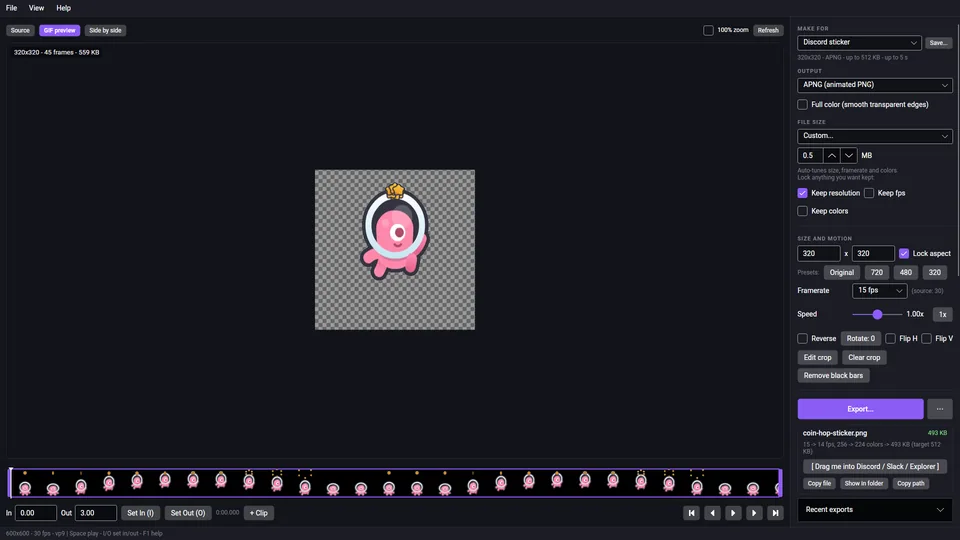
- Choose Discord sticker under Make for. The output becomes APNG at exactly 320×320 with a 512 KB target.
- Frame it. Video gets a centred square crop you can drag. A transparent character that isn’t square is fitted whole and padded with transparency, so nothing gets cut off.
- Export. Because the sticker size is fixed, the search lowers the frame rate and colors instead of the size.
Transparent backgrounds
A sticker looks best without a box around it. There are two ways to get one:
- Start from a source that already has transparency: a VP9 WebM with alpha, a ProRes 4444 MOV, a transparent GIF, APNG or animated WebP, or a folder of transparent PNGs. The transparency is kept automatically.
- Remove a color. In the Transparency section, tick Remove color, click Pick, then click the green screen (or any flat background) on the Source view. Raise Similarity until the background is gone, and use Edge softness to smooth the cut.
GIF, and APNG in its default 256-color mode, can only make a pixel fully see-through or fully solid, so soft edges come out jagged. Clean edges for fixes that by blending the edge onto the color the sticker will sit on: choose Discord dark or Discord light. For APNG you can instead tick Full color (smooth transparent edges), which keeps half-transparent edges as they are, at the cost of a larger file.
About the preview: the preview pane always encodes a GIF, with GIF’s hard edges. A full-color APNG sticker looks smoother in Discord than it does in the preview.
There’s no automatic background removal. More on transparent GIFs and stickers →
If it won’t fit
512 KB is not much for five seconds of animation. If the app reports that even its lowest settings are over the limit, try these, roughly in order:
- Shorten it. Two seconds that loop beat five that don’t.
- Use fewer frames. In Loop and frames, Drop frames removes every 2nd, 3rd or 4th frame, and Max frames caps the count.
- Try a boomerang. Boomerang (forward, then back) doubles the length on screen from the same footage. It still adds frames, so pair it with a short selection.
- Simplify the motion. A character moving on a transparent background is much cheaper than a moving camera.
Uploading
Emoji and stickers are uploaded per server, under the server’s settings, by someone with permission to manage them. How many a server can hold depends on its boost level. Drag the exported file from the export box, or use Show in folder and pick it in Discord’s upload dialog.
Other sticker formats
The same Make for list covers the other chat apps:
| Preset | Format | Size | Limits |
|---|---|---|---|
| WhatsApp sticker | Animated WebP | 512×512 | Up to 500 KB, up to 10 s |
| iMessage sticker | APNG | 408×408 | Up to 500 KB |
| Slack emoji | GIF | 128×128 | Up to 128 KB, up to 50 frames |
Streaming emotes have their own guide: Twitch, 7TV and BetterTTV emotes.
Frequently asked questions
What size should an animated Discord emoji be?
128×128 pixels and under 256 KB. Discord shows emoji much smaller than that, so crop tightly. The Discord emoji preset sets both for you.
What format should a Discord sticker be?
At the time of writing Discord accepts animated stickers as APNG or GIF, at 320×320, up to 512 KB and up to 5 seconds. The Discord sticker preset makes APNG.
Can I make a sticker from a GIF I already have?
Yes. Open the GIF, choose Discord sticker under Make for, and export. A transparent GIF stays transparent.
Why do my sticker's edges look jagged?
GIF and 256-color APNG have no half-transparent pixels. Use Clean edges for with Discord dark or Discord light, or tick Full color (smooth transparent edges) for APNG. The preview itself always shows GIF edges.
Can it remove the background from my video automatically?
No. Transparency comes from the source, or from removing a color such as a green screen.